The short answer
A local station can produce vertical video from the newscasts it already makes, without a separate vertical crew, by treating vertical as a version of the broadcast rather than a second production. Pick a few recurring segments, agree how each type of shot is reframed for a 9:16 screen, keep captions and essential graphics readable, and send every output through one review step before it is published. The broadcast stays the source: vertical versions are cut from the recorded show or the live feed, recomposed for a phone, captioned and delivered to the station's app, website and social accounts. People are still needed, but for editorial work rather than re-editing: choosing which stories travel, checking shots the system frames poorly, and approving anything involving breaking news, named individuals or sensitive material. This guide covers segment choice, reframing rules by shot type, graphics, captions and rights, the review step and a launch checklist.
Why local newsrooms are adding vertical
The case rests on where news video is now watched. In a Pew Research Center survey of 5,166 U.S. adults conducted August 24-30, 2026, 20% said they regularly get news on TikTok, unchanged from 2025 and up from 3% in 2020. Among adults ages 18 to 29 the figure was 39%, and 53% of TikTok users said they regularly get news there. The Reuters Institute's Digital News Report 2026, published on June 16, 2026 and averaging across 48 markets, found that 77% of people consume online news video each week and that in 45 markets more people now watch online news video than watch broadcast TV news. Social media and video networks were for the first time the most widely used way of accessing online news, used by 54% of respondents, ahead of news organisations' own websites and apps at 51%, and video consumption on mainstream news organisations' own sites and apps went down 5 percentage points. Neither study measures local news on its own, so treat the figures as a direction rather than a forecast for one market. The practical reading for a station is that the newscast reaches part of its potential audience on air, and a growing share of the rest watches news video on a phone, in feeds built around vertical video.
Which segments to take vertical first
Start with segments that recur, make sense without the anchor's lead-in and have a clear publishing window. Weather is usually the best first candidate: it is produced every day, often several times a day, and the same forecast is wanted on air, in the app and on social. Top stories from the evening newscast come next, especially packages with strong field video that explain themselves in under a minute. Interviews and in-studio guests work when the answer to one question stands alone. Live breaking coverage is the hardest case, because shots change unpredictably and accuracy matters most, so add it after the recorded workflow is reliable. For each segment, write down the outputs it should feed, such as a vertical clip for social, a version for the station app and a short preview for the website, and how soon after air each one is needed. One segment that publishes reliably every day teaches a newsroom more than a pilot that tries to convert the whole newscast at once.
Reframing rules by shot type
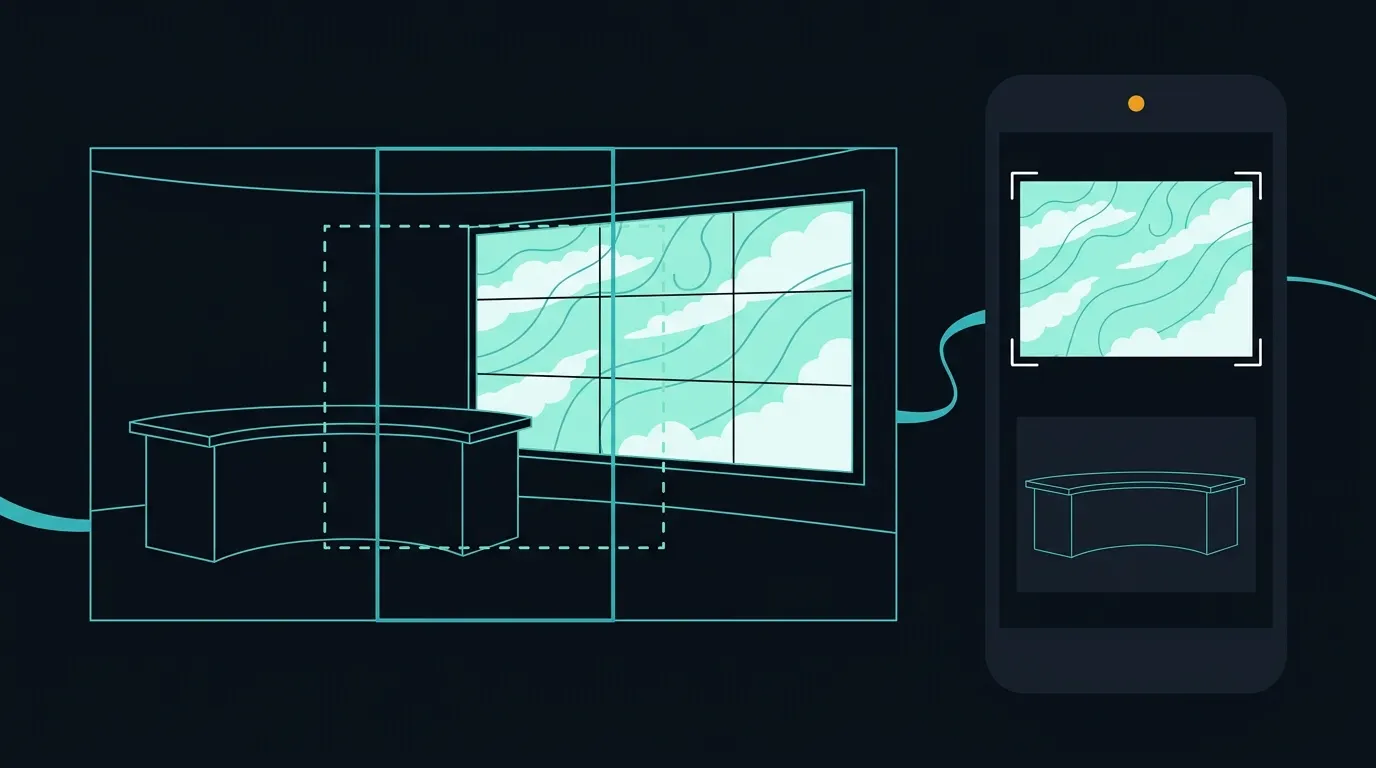
A newscast is built from a small number of shot types, and each needs its own rule for 9:16. A single anchor shot is the easy case: keep the face in frame with sensible headroom and let the crop follow small movements. An anchor with an over-the-shoulder graphic box is harder, because a phone-width crop either cuts the box in half or drops it; decide whether the box matters for that story and, if it does, use a layout that stacks the anchor and the graphic. Two-shots and anchor-to-reporter hand-offs need a choice between cutting to whoever is speaking and showing both in a stacked layout. The weather wall is the classic failure of a center crop: the meteorologist stands on one side and the map or radar loop fills the other, so a single crop keeps one and loses the other, while a split or stacked layout keeps the person and the graphic they are explaining. Field packages are mostly b-roll and interviews, where following the main subject works well. Full-screen graphics, maps and tables rarely survive a crop and usually need a vertical version or a slow pan. Finally, define a fallback for shots the system cannot classify confidently, such as a wider frame or a flag for review, instead of letting it guess.
Lower thirds, captions and rights
Broadcast lower thirds sit along the bottom of a 16:9 frame, which is where a vertical crop cuts them and close to where Shorts, Reels and TikTok place their own captions, buttons and account names. Either rebuild the key text, such as a name, title or location, as a vertical graphic inside the safe area, or keep the lower-third region in a stacked layout; the guide to vertical video safe zones covers the overlays per platform. Captions let a clip work for viewers who watch with the sound off, and in the United States they can be a legal requirement. Under 47 CFR 79.4, when a video programming distributor or provider posts on its own website or application a clip of programming it showed on television with captions, the clip must be captioned: within 12 hours after the programme ends for clips of live programming, and within 8 hours for near-live programming, meaning programming recorded less than 24 hours before it first aired. The rule's text is tied to the distributor's own site or app and does not address third-party platforms, but captioning the social versions as well keeps one workflow. Rights are the other check. A local newscast can contain network or syndicated material, wire and pool video, and music that a station may air but is not necessarily cleared to post elsewhere. YouTube Help notes that using copyright-protected material in a Short can lead to a Content ID claim, and that a valid takedown notice can lead to removal and a copyright strike, so mark restricted sources in the rundown before anything is cut.
One review step instead of a second crew
The staffing model that works for most newsrooms puts automation between the broadcast and a single reviewer. Producers mark which segments should travel, either in the rundown or by accepting proposed clips; the system cuts, recomposes and captions them; and one digital producer checks each output at real phone size before approving it. Agree which outputs may publish without approval, such as a recurring forecast that passes its checks, and which always need a person: breaking news, crime and court stories, anything naming minors or private individuals, and any clip the system flagged as low confidence. Keep each vertical clip linked to its source programme, air time and story, so a reviewer can compare it with the original and each clip can point viewers to the full story or the live stream. YouTube Help says a Short can be up to 3 minutes long with a square or vertical aspect ratio, so length is set by the story and each destination's rules rather than by habit. Measure the workflow on three things: time from air to publish, the share of outputs approved without fixes, and whether vertical viewers go on to the full story, the app or the live stream, not only how many views each clip gets.
Where Minute-ly.com fits
Minute-ly.com's Smart Composition recomposes horizontal live or on-demand video for vertical, portrait, square and foldable screens. Beyond a center crop or a tracking crop, it can rearrange multiple regions, such as a presenter and supporting footage, into a new layout, which is the situation a weather wall or an over-the-shoulder graphic creates. The Video AI Engine connects live streams, broadcast feeds, VOD and video libraries, identifies scenes, people, speakers, action and context, and generates derivatives such as highlights, previews, vertical clips and captions. Layouts, safe areas for captions and graphics, processing latency and review rules are agreed for each station and confirmed in a production trial on its own segments, and outputs are delivered to the station's existing publishing systems. The local TV stations page describes how the same workflow extends to weather, community reporting and previews.
Checklist for vertical local news
Pick one recurring segment, usually a forecast, and list the outputs and publishing deadlines it should feed. Write a reframing rule for each shot type in that segment: single anchor, anchor with graphic box, two-shot, weather wall, field package and full-screen graphic, plus a fallback for unclear shots. Decide how lower thirds and key text appear in vertical and keep them inside each platform's safe area. Caption every output, and for clips of captioned programming on the station's own site or app, meet the 12-hour and 8-hour windows for live and near-live clips. Mark network, syndicated, wire and music sources that cannot be posted. Name one reviewer, set what may publish automatically and what always needs approval, and check outputs at phone size. Link every clip to its source story or the live stream. Track time to publish, approval without fixes and onward viewing, then add the next segment once the first one runs reliably.